Table of Content
- The 7 Phases of SDLC
- Phase Deep Dives
- Phase 1: Planning
- Phase 2: Requirement Analysis
- Phase 3: System Design
- Phase 4: Implementation (Coding)
- Phase 5: Testing & Quality Assurance
- Phase 6: Deployment
- Phase 7: Maintenance
- SDLC Models: Which One Should You Use?
- Model Decision Guide
- Common SDLC Problems and How to Solve Them
- Problem 1: Scope Creep
- Problem 2: Late Security Testing (Shift Left)
- Problem 3: Poor Estimation
- Problem 4: Developer-Stakeholder Communication Gaps
- Problem 5: No Maintenance Planning
- Problem 6: Inadequate Test Coverage
- SDLC Tools by Phase
- AI in SDLC: What is Changing in 2026
- SDLC Topics Most Articles Skip
- Technical Debt Management
- Documentation as a Formal Deliverable
- SDLC for MVP and Startup Development
- Regulatory Compliance Checkpoints
- Post-Mortem Reviews as SDLC Practice
- Stakeholder Onboarding in SDLC
- Need Help with Your Software Project?
- Digisoft Solution: Custom Software Development Company
- What Digisoft Solution Offers
- We serve for
- Quick Reference: SDLC Checklist
Digital Transform with Us
Please feel free to share your thoughts and we can discuss it over a cup of coffee.
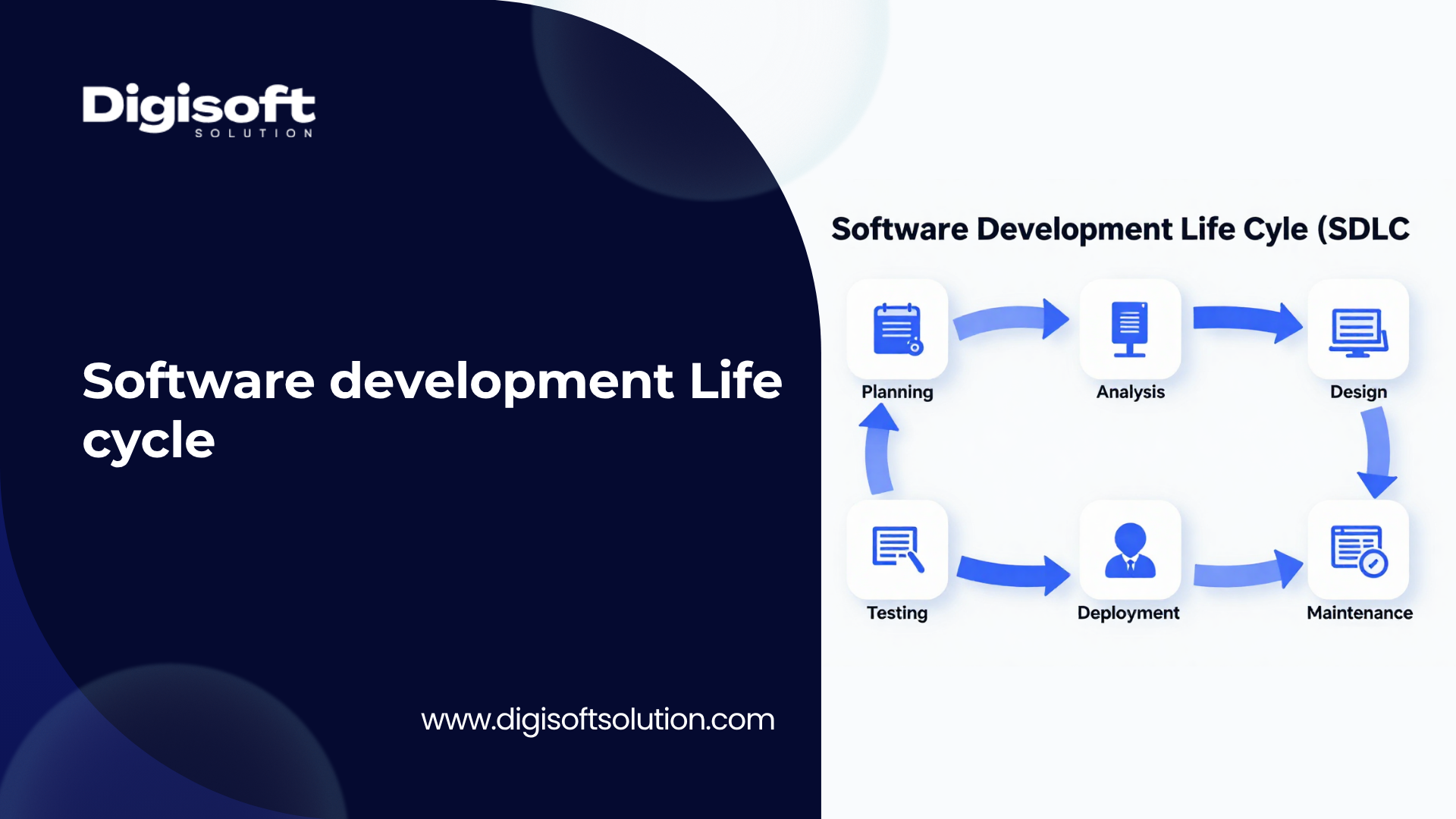
The Software Development Life Cycle (SDLC) is a structured, repeatable framework that guides software teams through every stage of building, testing, and delivering software, from the initial idea to post-launch maintenance. It is the difference between a project that ships on time, on budget, and with high quality, versus one that overruns, breaks in production, and costs more than expected.
In simple words, SDLC is a step-by-step process that answers three questions for every software project: What are we building? How do we build it? How do we keep it running? It replaces guesswork with a structured, quality-driven workflow.
Without SDLC, software projects fail not because of bad developers, but because of unclear requirements, unmanaged scope, poor testing, and miscommunication between teams and stakeholders. SDLC solves these structural problems.
Why SDLC Matters
- Reduces project cost by catching bugs and requirement issues early, before they become expensive to fix
- Improves software quality through testing and reviews embedded at every stage
- Manages risk by identifying and mitigating threats during planning, not after deployment
- Gives full project visibility to stakeholders, project managers, and development teams
- Ensures on-time delivery within agreed timelines and budget constraints
- Provides documentation and traceability for audits, handovers, and compliance
- Enables scalability so teams can build larger, more complex systems without chaos
The 7 Phases of SDLC
The SDLC is divided into distinct phases. Each phase has specific goals, deliverables, key team members, and recommended tools. Skipping or rushing any phase creates downstream problems that are far more expensive to fix later.
|
Sr no. |
Phase |
What Happens |
Key Output |
Recommended Tools |
|
01 |
Planning |
Define project scope, timeline, budget, and resources. Stakeholders align on goals. Feasibility study (technical, operational, financial) is conducted. |
Project Plan, Feasibility Report |
Jira, Confluence, Trello, MS Project |
|
02 |
Requirement Analysis |
Gather and document what the software must do. Functional and non-functional requirements are captured. SRS document is produced. |
Software Requirement Specification (SRS) |
Confluence, Notion, Miro, Lucidchart |
|
03 |
System Design |
Translate requirements into a technical blueprint. High-Level Design (HLD) covers architecture, database, and APIs. Low-Level Design (LLD) covers individual component logic. |
HLD Doc, LLD Doc, Wireframes, Tech Stack Decision |
Figma, Draw.io, DbDesigner, Lucidchart |
|
04 |
Implementation (Coding) |
Developers write code based on design documents following coding standards, version control practices, and peer code reviews. |
Working Code, Code Repository |
GitHub, GitLab, VS Code, IntelliJ |
|
05 |
Testing & QA |
QA engineers run unit, integration, performance, security, and regression tests. Bugs are logged, fixed, and re-tested before deployment. |
Test Reports, Bug Logs, Sign-off |
Selenium, Jest, Postman, JUnit, Snyk |
|
06 |
Deployment |
Software is released to production using CI/CD pipelines, staging environments, and rollback strategies for a safe, controlled launch. |
Live Application, Deployment Report |
Jenkins, GitHub Actions, Docker, Kubernetes |
|
07 |
Maintenance |
Ongoing bug fixes, security patches, performance tuning, and feature updates. The cycle restarts as new requirements emerge. |
Patch Releases, Updated Features, Uptime Reports |
New Relic, Datadog, Grafana, PagerDuty |
Phase Deep Dives
Phase 1: Planning
This is the most critical phase. Projects that fail almost always trace back to weak or skipped planning. The planning phase defines the problem, not the solution. Key activities include:
- Feasibility study covering technical (can we build it?), operational (will people use it?), and economic (can we afford it?) dimensions
- SMART goal setting: Specific, Measurable, Achievable, Relevant, and Time-bound objectives
- Resource allocation: team roles, skill requirements, contractor vs in-house decisions
- Risk register creation: identify risks early and plan mitigation strategies
- Stakeholder mapping: identify who has input, who approves, and who is impacted
Pro Tip
Never start designing or coding before planning is signed off. 70% of project overruns happen because requirements were ambiguous at the planning stage
Phase 2: Requirement Analysis
Requirements are the single source of truth for the entire project. This phase produces the Software Requirement Specification (SRS), which defines exactly what the software must do (functional requirements) and how it must perform (non-functional requirements).
- Functional requirements: specific features, user actions, system behaviors
- Non-functional requirements: performance (response time under 2 seconds), security (OWASP compliance), scalability (10,000 concurrent users), and availability (99.9% uptime)
- User stories: written in plain language as "As a [user], I want [feature], so that [benefit]"
- Acceptance criteria: the definition of "done" for each requirement, agreed on before development starts
- Traceability matrix: links requirements to test cases so nothing is missed
Phase 3: System Design
Design bridges the gap between "what to build" and "how to build it." It has two levels that must both be completed:
- System architecture, component diagram, database schema, API contracts, technology stack selection, third-party integrations, and security architecture: High-Level Design (HLD)
- Detailed logic for individual modules, class diagrams, data flow diagrams, error handling patterns, and algorithm design: Low-Level Design (LLD)
Tech stack decisions made here have long-term consequences. Poor architectural choices in design create expensive technical debt in maintenance.
Phase 4: Implementation (Coding)
The development phase is where design becomes reality. Modern implementation follows these standards:
- Version control with Git (feature branches, pull requests, protected main branch)
- Code reviews for every merge: at least one reviewer must approve before merging
- Coding standards: naming conventions, file structure, commenting, and documentation inline with code
- Modular development: features built independently to enable parallel work and easier testing
- CI/CD integration: every commit triggers automated builds and test suites
- Sprint-based delivery: working increments delivered every 2 to 4 weeks (in Agile teams)
Phase 5: Testing & Quality Assurance
Testing is not a single event, it is a multi-layered process. A complete test plan includes all of the following:
|
Test Type |
What It Checks |
Tools |
|
Unit Testing |
Individual functions and components work correctly in isolation |
Jest, JUnit, PyTest |
|
Integration Testing |
Components work correctly together and APIs communicate properly |
Postman, REST Assured |
|
System Testing |
Complete system meets all functional and non-functional requirements |
Selenium, Cypress |
|
Performance Testing |
System handles expected load, identifies bottlenecks under stress |
JMeter, k6, Gatling |
|
Security Testing (SAST/DAST) |
Identifies vulnerabilities: SQL injection, XSS, authentication flaws |
Snyk, OWASP ZAP, Burp Suite |
|
User Acceptance Testing (UAT) |
Real users validate the software meets business needs before launch |
Manual, TestRail |
|
Regression Testing |
Confirms new changes have not broken existing functionality |
Selenium, Playwright |
Phase 6: Deployment
Deployment is not just pushing code to a server. A professional deployment follows a controlled process:
- Staging environment: an exact replica of production used for final verification before go-live
- CI/CD pipeline: automates build, test, and deployment so releases are consistent and repeatable
- Blue-green deployment: two identical production environments where traffic is switched instantly, allowing instant rollback if issues arise
- Canary releases: new version is released to a small percentage of users first to validate stability
- Rollback plan: every deployment must have a documented procedure to revert if something goes wrong
- Post-deployment monitoring: real-time dashboards tracking errors, response times, and traffic patterns immediately after launch''
Phase 7: Maintenance
Maintenance is the longest and most expensive phase of the SDLC, often consuming 60 to 80% of total software lifetime costs. It includes four categories:
- Fixing bugs and defects reported after launch: Corrective maintenance
- Updating software to work with new operating systems, browsers, or APIs: Adaptive maintenance
- Improving performance, usability, and adding new features based on user feedback: Perfective maintenance
- Code refactoring, dependency updates, and security patching to prevent future problems: Preventive maintenance
SDLC Models: Which One Should You Use?
There is no universal SDLC model. The right choice depends on project size, requirement stability, risk tolerance, team size, and business context. Here are the five most widely used models, with honest tradeoffs for each.
|
Model |
Best For |
Flexibility |
Risk Handling |
Typical Cost |
|
Waterfall |
Fixed-scope, well-defined projects |
Low |
Weak |
Lower upfront, higher rework |
|
Agile |
Evolving requirements, fast-moving products |
Very High |
Strong |
Variable, scales with sprints |
|
Spiral |
High-risk enterprise systems |
Medium |
Very Strong |
Higher, risk analysis adds cost |
|
Iterative |
Unclear initial scope, MVP development |
High |
Medium |
Moderate, early delivery of value |
|
DevOps / DevSecOps |
Continuous delivery, cloud-native apps |
Very High |
Strong |
Moderate, tooling investment upfront |
|
RAD (Rapid App Dev) |
Prototyping, time-critical launches |
High |
Low |
Lower for speed, higher for rework |
Model Decision Guide
Use this decision guide to select the right model for your specific situation:
- Use Waterfall when: Requirements are 100% fixed, the project is small, regulatory documentation is required (e.g., government contracts), and changes are extremely costly or contractually locked.
- Use Agile when: Requirements will evolve based on user feedback, the team is cross-functional and collaborative, stakeholders want frequent working demos, and the product is consumer-facing with competitive pressure.
- Use Spiral when: You are building a high-budget enterprise system with significant technical or financial risk. The built-in risk review at each cycle justifies the higher cost.
- Use Iterative/Incremental when: You need to deliver a working product quickly but know the full feature set will emerge over time. Common for MVP launches and startup products.
- Use DevOps when: Your team needs to release frequently (multiple times per week or day), you are running a cloud-native product, and reliability and speed of deployment are both critical.
Common SDLC Problems and How to Solve Them
Most SDLC articles describe the phases but skip the real problems teams face. Here are the most frequent issues encountered in real projects, along with practical solutions.
Problem 1: Scope Creep
Requirements keep expanding after development starts. Every "small addition" adds hours and shifts deadlines.
- Root cause: Requirements not formally signed off before coding begins
- Solution: Produce a signed SRS document before any development starts. All new requests go through a formal change control process with cost and time impact assessed before approval
- Prevention: Use a product backlog to capture future ideas without disrupting current sprint work
Problem 2: Late Security Testing (Shift Left)
Security treated as an afterthought in the testing phase misses architectural vulnerabilities introduced in design. These are far more expensive to fix after the fact.
- Root cause: Security team involved only at the end, not during design or development
- Solution: Adopt DevSecOps. Integrate Static Application Security Testing (SAST) during coding, Dynamic Application Security Testing (DAST) during QA, and Software Composition Analysis (SCA) to audit open-source dependencies for known vulnerabilities
- Prevention: Add security requirements to the SRS from the beginning, not as an afterthought
Problem 3: Poor Estimation
Teams consistently underestimate task complexity, leading to missed deadlines and rushed testing phases.
- Root cause: Estimation based on gut feel rather than data
- Solution: Use story points and historical velocity data from previous sprints. Always add 20% buffer for integration, testing, and unforeseen complexity
- Prevention: Break tasks into sub-tasks under 8 hours. If a task cannot be estimated accurately, decompose it further
Problem 4: Developer-Stakeholder Communication Gaps
Developers and business stakeholders use different language. Technical terminology confuses stakeholders; vague business requirements confuse developers.
- Solution: Write user stories in plain language with clear acceptance criteria. Hold regular sprint reviews where stakeholders see working software, not PowerPoint slides
- Prevention: Assign a Product Owner or Business Analyst as a dedicated communication bridge between technical and business teams
Problem 5: No Maintenance Planning
Post-launch support is unplanned. Teams move to new projects. Bugs pile up. Technical debt grows silently until the system becomes unreliable.
- Solution: Allocate a defined maintenance budget (typically 15 to 20% of initial development cost, annually) before the project starts
- Prevention: Schedule quarterly code audits, dependency updates, and performance reviews as part of the project roadmap from day one
Problem 6: Inadequate Test Coverage
Only functional testing is done. Performance, security, and regression testing are either skipped or de-scoped to save time, causing production failures.
- Solution: Build a formal test plan at the design phase that covers all test types. Make test case sign-off a gate before deployment approval
- Prevention: Automate regression and performance tests so they run on every code commit without requiring manual effort
SDLC Tools by Phase
Modern SDLC relies on an integrated tool ecosystem. The right tools reduce manual effort, improve collaboration, and create automated safety nets at every stage.
|
Phase |
Category |
Tools |
|
Planning |
Project Management |
Jira, Trello, Asana, ClickUp, Linear, Monday.com |
|
Planning |
Documentation |
Confluence, Notion, Google Docs, Coda |
|
Design |
Wireframing / UI |
Figma, Adobe XD, Sketch, Balsamiq |
|
Design |
Architecture |
Draw.io, Lucidchart, Miro, PlantUML |
|
Design |
Database Design |
dbdiagram.io, DBDesigner, pgAdmin |
|
Coding |
Version Control |
GitHub, GitLab, Bitbucket, Azure DevOps |
|
Coding |
IDE / Editor |
VS Code, IntelliJ IDEA, WebStorm, Eclipse |
|
Testing |
Automation |
Selenium, Playwright, Cypress, Appium |
|
Testing |
API Testing |
Postman, Insomnia, REST Assured, Hoppscotch |
|
Testing |
Security |
Snyk, OWASP ZAP, Burp Suite, Checkmarx |
|
Testing |
Performance |
Apache JMeter, k6, Gatling, Locust |
|
Deployment |
CI/CD |
Jenkins, GitHub Actions, CircleCI, GitLab CI |
|
Deployment |
Containers |
Docker, Kubernetes, Helm, AWS ECS |
|
Maintenance |
Monitoring |
New Relic, Datadog, Grafana, Prometheus |
|
Maintenance |
Error Tracking |
Sentry, Rollbar, Bugsnag, Raygun |
|
All Phases |
Communication |
Slack, Microsoft Teams, Zoom, Loom |
AI in SDLC: What is Changing in 2026
Artificial intelligence is reshaping how SDLC phases are executed. This is not a future trend. Teams using AI-assisted tools are shipping faster with fewer bugs today.
AI Use Cases Across the SDLC
- AI analyzes historical sprint data to predict realistic timelines and flag unrealistic estimates before a sprint begins: Planning and estimation
- Tools like GitHub Copilot, Cursor, and Amazon CodeWhisperer generate boilerplate code, suggest completions, and identify inefficiencies during coding: Automated code generatio
- AI predicts which areas of code are most likely to contain bugs based on change history and generates targeted test cases automatically: AI-driven testing
- AI-powered SAST tools like Snyk identify vulnerabilities in real time as code is written, not after deployment: Security vulnerability detection
- AI automatically generates human-readable summaries of code changes, speeding up code review cycles: Pull request summaries
- AI analyzes user behavior patterns during design to suggest more intuitive interfaces before the first prototype is built: Personalized UX design
- AI monitoring tools correlate anomalies across services to surface root causes faster during maintenance: Incident triage
Key Insight: AI does not replace SDLC. It accelerates each phase. Teams that adopt AI tooling within a structured SDLC framework see 30 to 40% faster delivery cycles without sacrificing quality.
SDLC Topics Most Articles Skip
After reviewing dozens of competitor articles, these critical sub-topics are consistently missing. Understanding them separates teams that execute well from those that struggle.
Technical Debt Management
Every shortcut taken during implementation becomes future maintenance cost. SDLC teams that do not formally track technical debt watch it compound until the system becomes expensive to change.
- Track all technical debt in your project management tool with a dedicated tag or label
- Allocate 15 to 20% of every sprint to debt repayment, not just new features
- Run quarterly code audits to measure debt accumulation and prioritize which items to address first
Documentation as a Formal Deliverable
Every phase must produce documented outputs. Teams that skip documentation create knowledge gaps when engineers leave, making onboarding new members expensive and slow.
- Phase outputs: SRS, HLD, LLD, test plans, deployment runbooks, API documentation, and maintenance logs
- Living documentation: use tools like Confluence or Notion where documentation is updated in real time alongside development, not written retrospectively
SDLC for MVP and Startup Development
Full enterprise SDLC is too heavy for early-stage products. Startups need a lean version that delivers value quickly while maintaining enough structure to avoid catastrophic mistakes.
- Lean SDLC phases for MVP: Discovery (1 week), Rapid Design (1 week), Core Build (4 to 6 weeks), Focused Testing (1 week), Soft Launch
- Skip HLD/LLD documents initially. Use lightweight architectural decision records (ADRs) instead
- Prioritize functional testing and security basics. Add performance testing as user numbers grow
Regulatory Compliance Checkpoints
Healthcare, financial, government, and legal software must embed compliance as a formal SDLC gate, not an optional step at the end.
- HIPAA (healthcare): data encryption, access controls, and audit trails must be in the design spec
- GDPR (EU users): data minimization, consent management, and right to erasure must be functional requirements
- SOC 2 (SaaS products): security, availability, and confidentiality controls must be tested and evidenced
- PCI-DSS (payments): Cardholder data protection requirements must be in the security testing checklist
Post-Mortem Reviews as SDLC Practice
After every major release or sprint, conduct a structured retrospective to capture what worked, what failed, and what to change. Teams that do this improve delivery velocity by 20 to 30% within three to four sprint cycles.
- What went well: Preserve these practices explicitly in your team playbook
- What went wrong: assign root causes, not blame. Focus on process failures, not individual mistakes
- What to change: define concrete action items with owners and deadlines, not vague intentions
Stakeholder Onboarding in SDLC
Non-technical stakeholders often feel excluded from the SDLC. This creates friction, late feedback, and missed requirements.
- Share a simple SDLC phase map with stakeholders at project kickoff, showing what happens at each stage and when their input is needed
- Use shared dashboards (Jira, Linear, or ClickUp) so stakeholders can self-serve progress updates instead of asking for status reports
- Conduct a demo at the end of every sprint or phase, so feedback is captured early, not at final delivery
Related Read: Secure Software Development Life Cycle
Need Help with Your Software Project?
Digisoft Solution: Custom Software Development Company
Digisoft Solution is a custom software development company specializing in SDLC-driven web and mobile applications. We help startups and enterprises build scalable, secure, and high-performance digital products with predictable timelines and transparent execution. We apply the right SDLC model to every project, from startup MVPs to enterprise platforms. Our team delivers on time, within budget, and with quality built in from day one.
What Digisoft Solution Offers
- Custom web and mobile application development using the right SDLC model for your project type
- End-to-end project management from requirements gathering through post-launch maintenance
- Agile development with bi-weekly sprint demos so you always see working progress
- Security-first development with DevSecOps practices built into every phase
- Dedicated maintenance and support plans to keep your software reliable and up to date
- Free initial consultation to assess your project, recommend the right approach, and provide a transparent estimate
We serve for
- Startup MVPs: We build lean, fast, and fundable products using iterative SDLC that gets you to market in 6 to 10 weeks.
- Enterprise software: Complex, high-risk systems managed with Spiral or Agile + DevOps for maximum quality and reliability.
- Ongoing Products: Continuous development teams with full DevOps pipelines for products that need frequent, reliable releases.
Quick Reference: SDLC Checklist
Use this checklist to verify your project is following SDLC correctly at each stage.
|
Sr no. |
Checkpoint |
Sign-Off Criteria |
|
P1 |
Planning complete |
Signed project charter, approved budget, named team, feasibility confirmed |
|
P2 |
Requirements frozen |
SRS signed off by stakeholders, traceability matrix created |
|
P3 |
Design approved |
HLD and LLD reviewed, tech stack confirmed, wireframes approved |
|
P4 |
Code review passed |
All PRs reviewed, coding standards met, no critical linting errors |
|
P5 |
Testing complete |
All test types passed, no open critical or high bugs, test report signed |
|
P6 |
Deployment ready |
Staging tested, rollback plan documented, monitoring dashboards live |
|
P7 |
Maintenance planned |
Support team assigned, SLA defined, incident response process documented |
Digital Transform with Us
Please feel free to share your thoughts and we can discuss it over a cup of coffee.