Table of Content
- What Is SDLC (Software Development Life Cycle)?
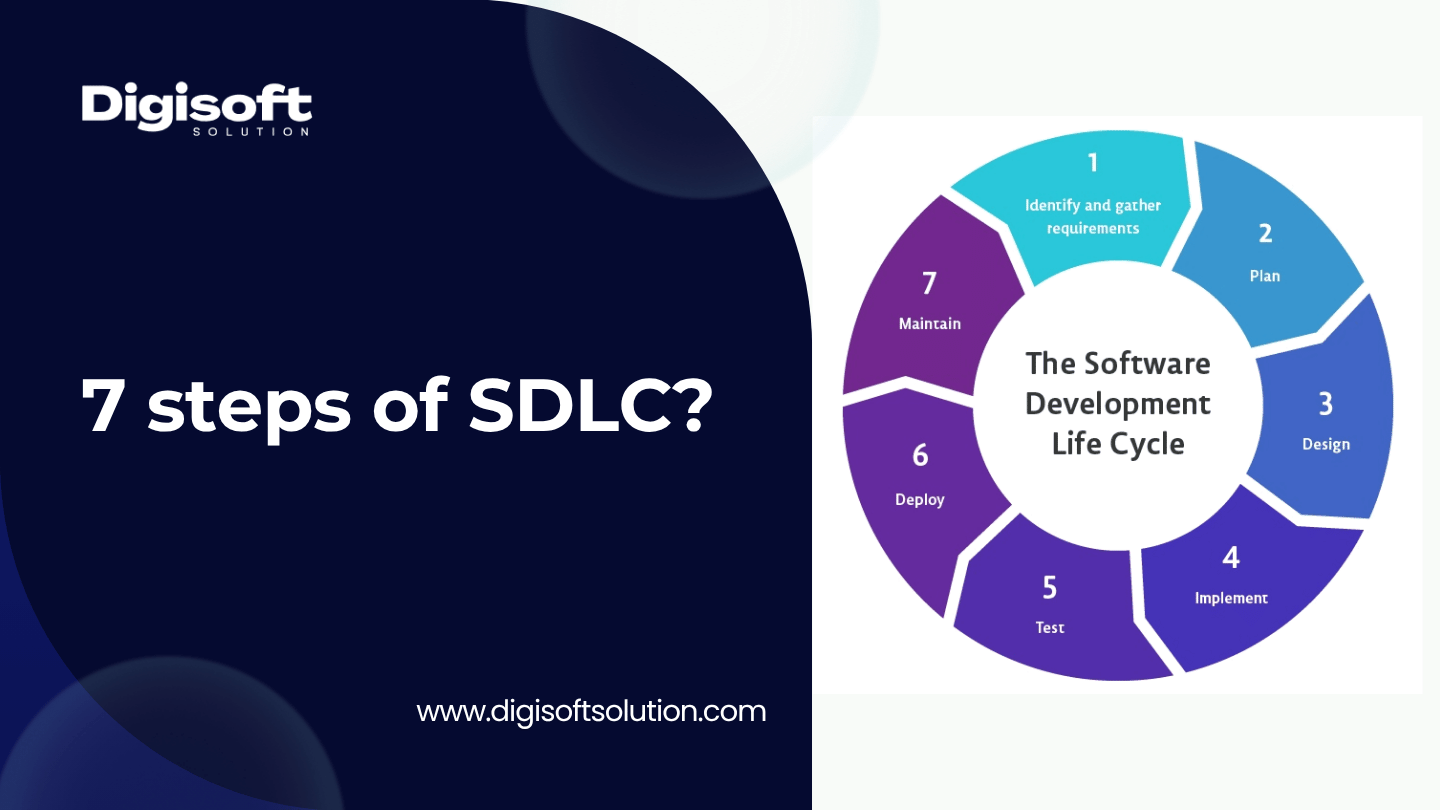
- The 7 Steps of SDLC Explained
- 1. Planning and Feasibility Analysis
- 2. Requirements Analysis
- 3. System and Architecture Design
- 4. Development (Implementation)
- 5. Testing
- 6. Deployment
- 7. Maintenance and Support
- Which SDLC Model Should You Actually Use?
- Waterfall
- Agile
- Iterative Model
- Spiral Model
- V-Model
- DevOps Model
- How Much Does SDLC Actually Cost? An Honest, Verified Breakdown
- Typical Budget Allocation Across the 7 Phases
- Developer Hourly Rates by Region (2026)
- Common Mistakes Teams Make During the SDLC
- Security in the SDLC
- Related Questions People Usually Ask Next
- SDLC vs Agile, what is the actual difference?
- Does SDLC have 6 phases or 7 phases?
- What is an SRS document and why does it matter?
- Which SDLC model works best for a startup MVP?
- How long does a full SDLC cycle usually take?
- How Digisoft Solution Helps You Execute Every Step of the SDLC
- Frequently Asked Questions
- What are the 7 steps of SDLC?
- What is the most important step in SDLC?
- Can SDLC steps overlap?
- Do all software projects need to go through all 7 steps?
- How is SDLC different from a project management methodology?
- How do I choose the right SDLC model for my project?
- Final Thoughts
Digital Transform with Us
Please feel free to share your thoughts and we can discuss it over a cup of coffee.
If you are building software for the first time, or the tenth time, chances are you have come across the term SDLC and wondered what it actually means for your project. SDLC, or Software Development Life Cycle, is basically the roadmap that takes an idea from a rough sketch on a whiteboard to a working, secure product that your users actually rely on every day. Most articles talk about it like some abstract framework, but honestly, once you break it down into its 7 steps, it starts making a lot more sense.
In this article we will walk through each of the 7 steps of SDLC in detail, look at the different SDLC models you can choose from, and get real about what each phase actually costs, because a lot of the pricing guides floating around online are outdated or just do not hold up when you check the numbers. We will also cover the mistakes teams commonly make, a few questions people usually search for right after this one, and where Digisoft Solution's software development services fit into this whole picture if you are looking for a team to actually build it with you.
What Is SDLC (Software Development Life Cycle)?
SDLC is a structured process that software teams follow to plan, build, test, release, and maintain an application. Instead of jumping straight into coding (which is how a lot of failed projects start, by the way), SDLC forces a team to think through requirements, architecture, and risk before a single line of code gets written. It is not a rigid rulebook, it is more like a checklist that keeps a project from going off the rails.
Here is why it actually matters for your project:
- It gives everyone, from developers to stakeholders, a shared understanding of what is being built and why.
- It catches expensive mistakes early. A requirement missed in the planning phase is cheap to fix. The same mistake found after launch is not.
- It creates predictable timelines and budgets, which is exactly what most founders and product owners are chasing.
- It builds in quality checkpoints (testing, reviews, security checks) instead of leaving them as an afterthought.
- It gives you a repeatable process, so your second project does not start from zero.
The 7 Steps of SDLC Explained
You will find some sources describing SDLC as a 6 phase process, usually because they merge requirements gathering into planning. That is not wrong exactly, but most engineering teams (us included) work in 7 distinct, clearly separated steps because each one has its own deliverables, its own owner, and its own exit criteria. Here is the breakdown.
1. Planning and Feasibility Analysis
This is where the project actually starts, and it has nothing to do with code. The goal here is to figure out if the idea is worth building at all, from a technical, financial, and operational standpoint. Senior developers, business analysts, and project managers usually sit together in this phase to define scope and flag risks before anyone commits a budget.
Key Activities
- Defining project goals, scope, and success metrics
- Technical and financial feasibility analysis
- Identifying risks, constraints, and dependencies
- Rough cost and timeline estimation
- Resource and team planning
Deliverables
- Project charter or scope document
- Feasibility report
- Initial budget and timeline estimate
2. Requirements Analysis
Once everyone agrees the project is worth doing, the team digs into what exactly needs to be built. This phase is where a lot of projects quietly go wrong, teams rush through it to get to development faster, and then spend twice as long later fixing misunderstandings that could have been caught here.
Key Activities
- Gathering functional and non-functional requirements from stakeholders
- Documenting user stories, workflows, and edge cases
- Prioritizing features (must-have vs nice-to-have)
- Getting formal sign-off from stakeholders
Deliverables
- Software Requirements Specification (SRS) document
- User stories and acceptance criteria
- Approved requirements backlog
3. System and Architecture Design
This is the blueprint phase. Architects and senior engineers translate requirements into a technical plan, covering everything from database schema to how services will talk to each other. Teams typically produce a High Level Design (HLD), which covers the overall architecture, and a Low Level Design (LLD), which gets into module-level detail.
Key Activities
- Choosing the technology stack and architecture pattern
- Database schema and data flow design
- API and integration design
- UI or UX wireframing and prototyping
- Security and scalability planning
Deliverables
- High Level Design (HLD) and Low Level Design (LLD) documents
- Wireframes or prototypes
- System architecture diagram
4. Development (Implementation)
This is the step most people think of when they hear software development, and it is usually the longest and most resource-heavy one. Developers write the actual code based on the design documents, following coding standards and doing peer reviews along the way. Depending on the project, this might involve frontend development, backend development, or full web application development and mobile app development running in parallel.
Key Activities
- Writing and reviewing code according to the design specs
- Setting up version control and CI or CD pipelines
- Unit testing as code is written
- Integrating third party APIs and services
Deliverables
- Working software builds
- Source code repository
- Technical documentation
5. Testing
Testing is not something that happens after development anymore, most modern teams shift testing left, meaning QA starts reviewing requirements and designs way before the first build is ready. This step exists to catch bugs, performance issues, and security gaps before your users find them for you. Digisoft Solution's software testing and QA services cover this end to end, including automation testing and security testing.
Key Activities
- Functional, regression, and integration testing
- Performance and load testing
- Security testing and vulnerability scanning
- User acceptance testing (UAT) with stakeholders
Deliverables
- Test plans and test cases
- Bug and defect reports
- UAT sign-off
6. Deployment
Once testing is signed off, the software gets released into a live environment. This can be a single big launch or, more commonly now, a phased rollout where features go live gradually through staging and production environments. This step is short compared to development, but it is high stakes, a bad deployment can undo months of good work.
Key Activities
- Setting up production infrastructure and environments
- Data migration, if applicable
- Final smoke testing in production
- Rollback and monitoring plan
Deliverables
- Live, deployed application
- Deployment and rollback documentation
- Monitoring dashboards
7. Maintenance and Support
SDLC does not end at launch, this is the step a lot of pricing calculators and quick-guide articles conveniently skip. Once real users are on the platform, bugs surface, new feature requests come in, and the software needs ongoing monitoring, patching, and performance tuning. Teams often pair this with .NET maintenance and support services or a broader cloud application development setup so scaling issues get handled proactively instead of reactively.
Key Activities
- Bug fixes and patches
- Performance monitoring and optimization
- Feature updates based on user feedback
- Security patching and compliance updates
Deliverables
- SLA-backed support cycles
- Regular performance and health reports
- Updated documentation and release notes
Which SDLC Model Should You Actually Use?
The 7 steps stay the same, but the model decides how you move through them, in a straight line, in loops, or somewhere in between. Picking the wrong model is one of those mistakes that does not show up until month three, so it is worth getting right early.
Waterfall
A strict, sequential model where each phase finishes before the next one starts. Good for projects with fixed, well understood requirements, like compliance-heavy systems, but it is rigid, and it does not handle changing requirements well.
Agile
Work is broken into short sprints, with continuous feedback and iteration. This is the default for most modern web and mobile products because it lets teams adjust as they learn more from users.
Iterative Model
Similar to Agile in spirit, the team builds a basic version first and improves it in repeated cycles. Works well when you know the core idea but not all the details yet.
Spiral Model
Combines iterative development with heavy risk analysis at every loop. Best suited to large, high-budget, high-risk enterprise systems where getting it wrong is expensive.
V-Model
An extension of Waterfall where every development phase has a corresponding testing phase mapped to it. Common in industries where verification is non-negotiable, like healthcare and aerospace.
DevOps Model
Development and operations work as one continuous loop, with automated CI or CD pipelines pushing small releases constantly. This is what most SaaS companies run on today because it keeps release cycles fast without sacrificing stability.
How Much Does SDLC Actually Cost? An Honest, Verified Breakdown
Most articles online give you a generic percentage split across phases and call it a day, without grounding it in real hourly rates or telling you if a rate is actually good value. We checked current 2026 market data before putting numbers in this article, and here is what it actually looks like.
Typical Budget Allocation Across the 7 Phases
|
SDLC Phase |
Typical Share of Build Budget |
Why |
|
Planning and Feasibility |
5% to 8% |
Short phase, mostly senior time, low headcount |
|
Requirements Analysis |
5% to 10% |
Analyst and stakeholder heavy, not code heavy |
|
Design (HLD/LLD, UX) |
10% to 15% |
Architecture and UX design work before coding starts |
|
Development |
40% to 50% |
Largest phase, most engineering hours go here |
|
Testing |
15% to 20% |
QA, automation, and security testing combined |
|
Deployment |
3% to 5% |
Short, but requires senior DevOps involvement |
|
Maintenance (annual, post-launch) |
15% to 20% of original build cost, per year |
Ongoing, not a one-time cost |
Developer Hourly Rates by Region (2026)
These ranges reflect vendor or agency bill rates for a dedicated developer, not freelancer quotes, which tend to be less reliable.
|
Region |
Hourly Rate Range |
Best Fit For |
|
India and South Asia |
$15 to $45 per hour |
Cost efficient scale, MVPs, staff augmentation |
|
Eastern Europe |
$35 to $70 per hour |
Senior engineering, complex or specialized work |
|
Latin America |
$25 to $55 per hour |
US time zone overlap, nearshore delivery |
|
United States |
$100 to $250 plus per hour |
In-house strategic roles, tight time zone needs |
Is the Cheapest Rate Actually the Best Deal?
Not automatically, and this is where a lot of pricing articles stop short. The headline hourly rate is where the math starts, not where it ends. Once you factor in management overhead, onboarding time, communication gaps, and rework, the real loaded cost usually lands at around 1.4 to 1.8 times the quoted rate. So a $20 per hour developer with heavy oversight needs and a lot of rework can genuinely cost more, in real terms, than a $40 per hour senior developer who needs almost no hand holding.
The technically correct way to evaluate cost is total cost of ownership across the whole 7 step SDLC, not the sticker price of one phase. If you want an estimate based on your actual scope instead of a generic guide, Digisoft Solution's software development cost calculator gives you a project specific number in a few minutes, and it is a lot more useful than a blog post's average.
Common Mistakes Teams Make During the SDLC
Even experienced teams mess this up sometimes, usually not because they do not know the steps, but because they treat the process mechanically instead of thinking about what each step is actually for.
- Treating documentation as the finish line, producing an SRS or design doc without actually validating it against real users.
- Rigid execution, following the plan even when business or technical reality has clearly changed.
- Underestimating complexity, scalability and integration risks that only show up late, when they are expensive to fix.
- Unclear ownership, where roles exist on paper but nobody is actually accountable for outcomes.
- Skipping proper stakeholder sign-off on requirements, which is one of the most common causes of scope creep.
Security in the SDLC
Security should not be a phase you bolt on right before launch. It needs to run through all 7 steps, from threat modeling in the design phase to automated vulnerability scans in CI or CD pipelines. If you want a deeper walkthrough of this, we have covered it in detail in our Secure Software Development Life Cycle guide on the Digisoft Solution blog.
Related Questions People Usually Ask Next
A few questions tend to come up right after this one, so we are covering them briefly here to save you another search.
SDLC vs Agile, what is the actual difference?
SDLC is the overall process, the 7 steps we covered above. Agile is one of several models you can use to move through those steps. In short, SDLC is the what, Agile is one possible how.
Does SDLC have 6 phases or 7 phases?
Both versions exist in the industry. The 6 phase version usually merges requirements analysis into planning. The 7 phase version, which we used in this article, separates them because in practice they involve different people, different timelines, and different sign-offs.
What is an SRS document and why does it matter?
SRS stands for Software Requirements Specification. It is the document produced in the requirements analysis phase that spells out exactly what the software needs to do. It matters because it is usually the reference point used to settle disputes about scope later in the project.
Which SDLC model works best for a startup MVP?
Agile or the Iterative model, in most cases. Startups rarely know every requirement upfront, and both models let you build, get real user feedback, and adjust without redoing the whole project. If you are at this stage, our MVP development services and software development for startups page go into this in more depth.
How long does a full SDLC cycle usually take?
It depends heavily on scope, but as a rough benchmark, a lean MVP typically takes 6 to 12 weeks, while a full enterprise platform can run anywhere from 4 to 12 months, sometimes longer when compliance requirements are involved.
How Digisoft Solution Helps You Execute Every Step of the SDLC
Reading about the 7 steps is one thing, actually running a project through them without losing time or budget is a different problem. This is the part where we talk about how we do it, so feel free to skip ahead to the FAQ if you just wanted the SDLC explanation.
Digisoft Solution has been in this business for over 13 years, and we run projects through the same 7 step process outlined above, with a dedicated team at each stage instead of one generalist trying to cover everything.
- Planning and requirements: our IT consulting and software consulting services teams sit with you before development starts, so the architecture decisions are made with your business goals in mind, not just technical convenience.
- Design: our UI/UX design services team handles wireframing, prototyping, and product design so the interface actually matches how your users work.
- Development: whether it is a custom software build, a web application, or a mobile app, our engineers work across React, Angular, Node.js, .NET, Laravel, Flutter, and React Native, matched to what your product actually needs.
- Testing: our software testing and QA team runs manual, automated, and security testing in parallel with development, not after it, so bugs get caught early.
- Deployment and maintenance: we support cloud application development and SLA-backed maintenance, so your application keeps performing after launch instead of getting handed off and forgotten.
- Flexible team models: if you already have a team and just need extra hands, our staff augmentation and hire dedicated developers options let you scale up without the long-term overhead of direct hiring.
We have run this exact process for platforms across healthcare, government, and marketplace businesses. A few examples worth a look, our AI-driven urban intelligence platform for Veridian Urban Systems, the HIPAA-compliant ABA therapy platform for S Cubed, and the real-time booking platform for IHLAQ in Qatar. You can browse the full list on our case studies page, and if you want more reads like this one, our blog covers SDLC, security, and software cost topics regularly.
Frequently Asked Questions
What are the 7 steps of SDLC?
Planning and feasibility, requirements analysis, design, development, testing, deployment, and maintenance. Each step has its own deliverables and, usually, its own team involved.
What is the most important step in SDLC?
There is not really one answer here, but requirements analysis is where most expensive mistakes originate. A weak SRS document tends to cause problems that ripple through every phase after it.
Can SDLC steps overlap?
Yes, in Agile and DevOps models especially, phases like development and testing run in parallel rather than strictly one after another. Waterfall and V-Model are the exceptions, where steps stay sequential.
Do all software projects need to go through all 7 steps?
Technically yes, though for small projects some steps get compressed rather than skipped. Even a simple MVP still needs some planning, some design thinking, and some testing, just at a smaller scale.
How is SDLC different from a project management methodology?
SDLC defines what needs to happen at the software level, planning, design, coding, testing, and so on. Project management methodologies like Scrum or Kanban define how the team's day-to-day work gets organized within those phases. They work together, not instead of one another.
How do I choose the right SDLC model for my project?
Base it on how well defined your requirements are and how much risk tolerance you have. Fixed, well understood scope tends to fit Waterfall or V-Model. Evolving, user feedback driven products fit Agile, Iterative, or DevOps better. If you are unsure, talking to a software consulting team before you commit to a model usually saves time later.
Final Thoughts
The 7 steps of SDLC are not just theory you read once and forget, they are the actual difference between a project that ships on time and one that quietly drifts for months. Planning, requirements, design, development, testing, deployment, and maintenance, each step protects the ones after it. Skip one, or rush it, and the cost usually shows up later, bigger than it would have been if you had caught it early.
If you are scoping a new build, or trying to figure out where an existing project is falling behind in its own SDLC, the Digisoft Solution team is happy to look at it with you, free consultation, no pressure to commit.
Digital Transform with Us
Please feel free to share your thoughts and we can discuss it over a cup of coffee.